Hard Tune Studio
Snap to pitch, zero glide — the T-Pain sound.
Sing into your phone and Voice Tune tunes you in real time. Then pick a studio look — one tap, and your whole take sounds finished. Audio or video, free on iPhone and iPad.
Studio engine
Off-key takes snap to the right note — automatically, in the key and scale you're actually singing in.
Before your raw take
After locked to the scale
Templates
Pick a sound and it applies to your whole take — tuning style and matched effects chain together. Then tweak anything you like.
Snap to pitch, zero glide — the T-Pain sound.
Invisible correction. Nobody can tell.
Your voice fills an arena.
Natural tune plus a tight doubler.
Transparent, note-perfect polish.
Harmonies bloom on held notes.
How it works
Four steps, and Voice Tune does the hard part automatically. You just sing.
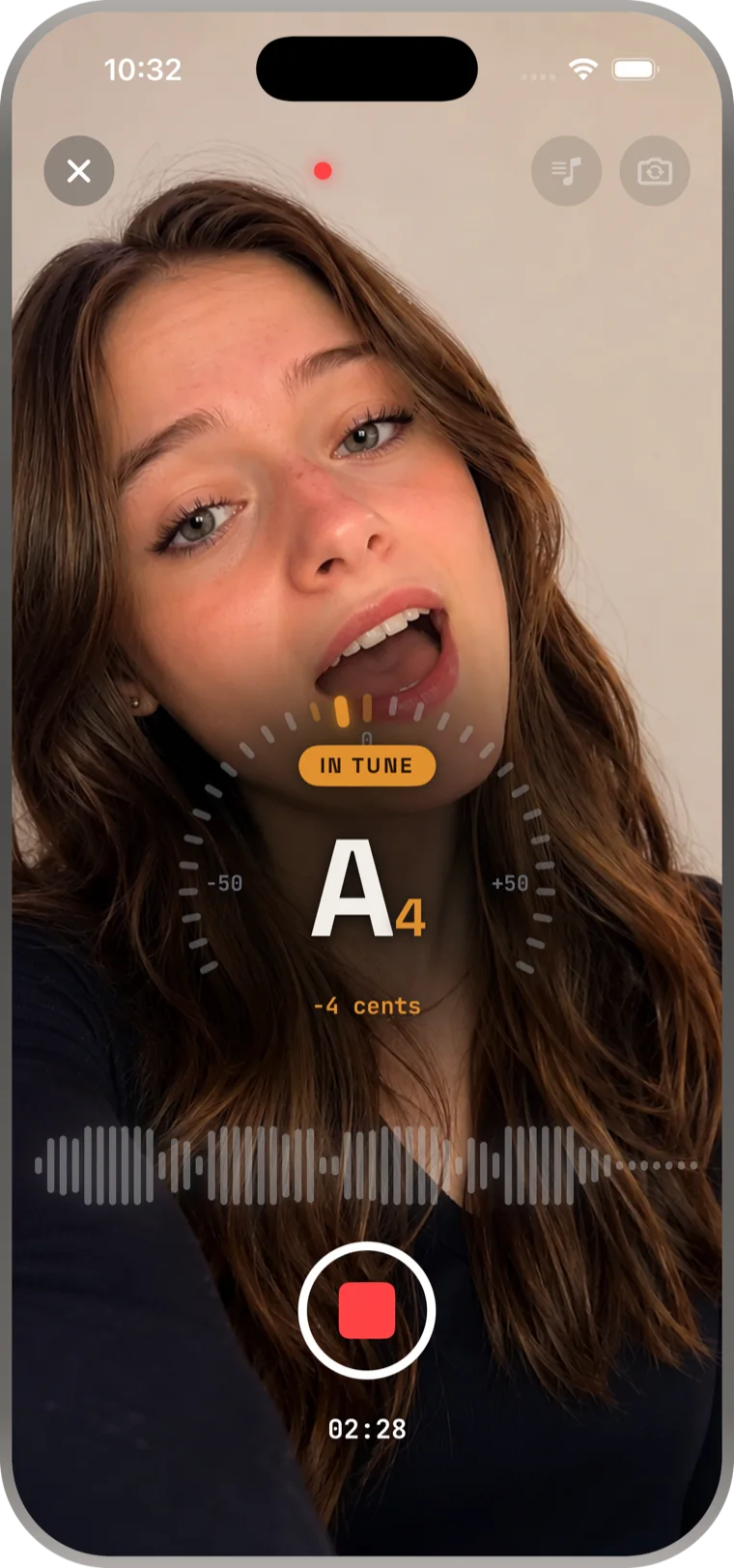
Hit the button and sing or speak — to a backing track, on camera, or straight into the mic. The tuner shows the exact note and how many cents off you are, live.
Tap a look — Natural Tune, Hard Tune, Stadium, Pop Star, Choir — and it applies to the whole take instantly. Preview and switch as often as you like.
Open the Adjust sheet for reverb, EQ, delay, compression, de-noise, and output volume. Every dial is yours; Reset puts any of them back.
Send the finished take out as audio or video, share it straight to social, or keep building your library of projects inside the app.
Inside the app
Everything you'd expect from a vocal chain, sized for a phone.
A tick-arc tuner reads your note, octave, and cents off while you sing — in tune, flat, or sharp, at a glance. It doubles as ear training.
Record video with the tuner on screen. Your vocal is corrected and processed, then muxed back with the footage — ready to post.
Import a backing track from Music or Files and sing karaoke-style. Mic, Track, and Monitor levels are set independently before you roll.
Five-band EQ with Classic, Pop, Jazz, and Rock presets, reverb rooms and halls, delay, compression — with a per-effect Reset when you overcook it.
Lift a clean voice out of any recording — strip hiss, hum, and room noise, pull an acapella to practise with, or make your own karaoke bed.
Edit on the waveform itself — trim the top and tail, fade the ends, and set the key and scale the correction should follow.
Screenshots
Record, choose, adjust, done — the whole app is four screens deep.


Download
Works on iPhone and iPad. Download Voice Tune and tune your first take in under a minute.
Guides
Step-by-step guides for everything you can do with your voice and an iPhone.
The complete beginner's walkthrough: record, pick a template, and apply pitch correction in under a minute.
Read the guide → Free AppWhat to look for in a free pitch correction app — and how Voice Tune stacks up on features, sound, and price.
Read the guide → RecordingGet clean, professional-sounding vocal recordings with just your phone — mic tips, room tips, and app setup.
Read the guide → Pitch CorrectionSang a little flat? Learn how automatic pitch correction rescues off-pitch takes without re-recording.
Read the guide → De-NoiseKill hiss, hum, and room echo on iPhone with one tap — and keep your voice sounding natural.
Read the guide → EffectsSmall room, hall, or stadium? How to pick the right reverb and mix level for singing vs. rap vs. spoken word.
Read the guide → T-Pain EffectThe exact settings for that hard-tuned, robotic vocal sound — template, strength, glide, and delay.
Read the guide → PracticeUse live pitch detection as a vocal coach: see the note you're hitting in real time and fix it.
Read the guide → Isolate VocalsPull clean acapellas out of any track — or remove the vocals to make your own karaoke backing track.
Read the guide → Voice ImprovementTechnique + technology: warmups, mic placement, and the processing chain that flatters any voice.
Read the guide →FAQ
Yes. Voice Tune is free to download on the App Store and includes recording, the live tuner, pitch correction, reverb, EQ, and de-noise. A handful of Studio templates and advanced effects are premium upgrades. Learn more →
Open Voice Tune, tap Record and sing — the tuner shows the note and how many cents off you are. Stop, then pick a template such as Natural Tune or Hard Tune; it applies to your whole take instantly. Tap Adjust to fine-tune strength, reverb, EQ, delay, and mix. Learn more →
A template is a complete vocal look — a tuning style plus a matched effects chain — applied in one tap. There are 28, from Natural Tune and Studio Tune to Hard Tune, Pop Star, Stadium, Choir, Gospel Stack, Lo-fi, Telephone, and Robot. Nothing is locked: every template stays fully editable in the Adjust sheet.
Yes. Voice Tune analyses your recording and pulls every note to the nearest correct note in your key and scale. Strength controls how hard it pulls — Natural Tune is invisible, Hard Tune snaps with zero glide. Learn more →
Yes. Voice Tune records video as well as audio, with the live tuner on screen while you sing. Your vocal is tuned and processed, then exported back with the footage — ready to post.
Yes. Import a non-DRM backing track from your Music library or Files, tap Record, and sing along karaoke-style. Mic, Track, and Monitor levels are set independently, and your voice is captured on its own track so you can tune and mix it afterwards. Learn more →
Yes. Isolate Vocals lifts your voice out of the recording and strips hiss, hum, and room noise, and the EQ and Compressor polish the result to a studio-quality sound. Learn more →
Pick the Hard Tune template — it snaps to pitch with zero glide, which is exactly that sound. For a full android voice, use the Robot template instead, or open Adjust and add the delay and distortion yourself. Learn more →
Yes. Isolate Vocals separates the voice from a track — grab a clean acapella to practise with, or remove vocals to make your own karaoke backing track. Learn more →
Correction polishes recordings, but the live tuner also trains your ear — you see the exact note you're hitting and how far off it is in real time, which is one of the fastest ways to learn to sing in tune. Learn more →
Yes. Voice Tune is a universal iOS app that runs on both iPhone and iPad, and it's free to download. Get it on the App Store →
Join 300,000+ singers, rappers, and creators who enhanced their voice with Voice Tune. Free to download — tuning takes seconds.
Download Voice Tune Free